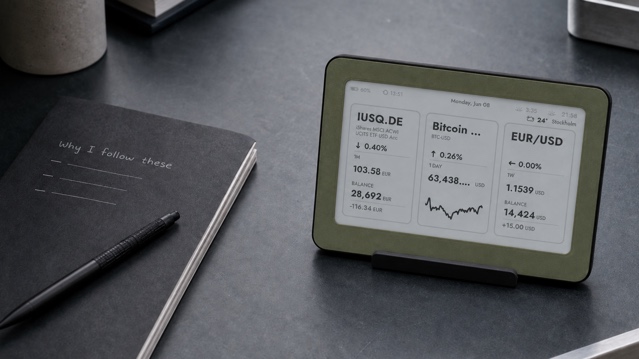
A calm watchlist starts with questions, not symbols. Decide what you want to notice, limit the screen to information you already understand and remove anything that creates noise without helping. On an e-ink display, that usually means one to three carefully chosen market references—not a miniature trading terminal.
The short method is simple: give the list one job, choose a familiar symbol for each question, stop at three, use a slow viewing rhythm and review the list once a month. The display should help you stay oriented. It should never tell you what to buy or pressure you to act.
1. Give the watchlist one job
Before opening a symbol search, complete one sentence: “I use this screen to keep a broad sense of …” The answer might be a company you already follow for work, a diversified fund you already research, or an input price relevant to a hobby or small business. The answer should describe a reason, not a hope that something will rise.
This sentence is a filter. A symbol belongs only if seeing it changes a useful question into a quick check. If you still need to invent a reason after adding the ticker, remove it. A calm display works because its scope is narrower than a finance app.
- Good job: keep a broad view of three markets I already review elsewhere.
- Good job: notice whether a work-related input price has moved enough to investigate.
- Weak job: find something exciting every day.
- Weak job: tell me whether to buy, sell or hold.
2. Understand what each category represents
A stock represents an ownership interest in one company. That makes a company share specific: its price can reflect company news as well as wider market conditions. Investor.gov describes stocks as securities that give shareholders a share of ownership in a company. A ticker can identify the share, but it cannot explain the business, valuation or risk behind it.
Investor.gov: what stocks are and what ownership means →
An exchange-traded fund pools money and holds a portfolio of assets. Each ETF share represents an interest in that portfolio, while retail investors trade ETF shares on an exchange at market prices. The label ETF is not enough to understand a fund: its objective, holdings, costs and risks still require reading the fund information.
SEC Investor Bulletin: characteristics of ETFs and mutual funds →
A commodity reference may point to a spot price, futures market or an exchange-traded product linked to commodities. Those are not interchangeable. The CFTC advises people to understand how physical, futures and securities markets differ before reacting to market stories. On a home screen, the label is orientation—not a complete description of the instrument or its risks.
CFTC customer advisory: understand commodity markets before reacting →
See the Brisa Daylo e-paper market display on Etsy →
3. Stop at three symbols
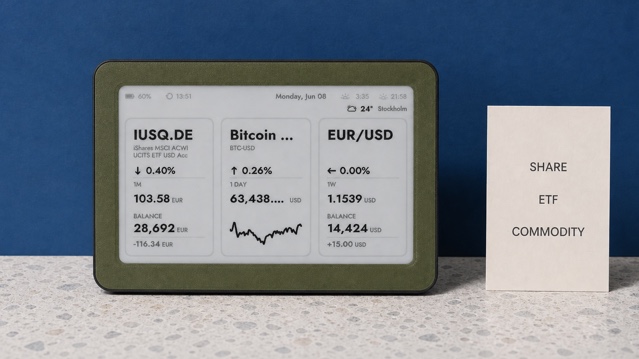
Brisa can display up to three market tickers with compact charts. Treat that limit as an editorial advantage. Three cards remain readable from a normal desk distance and force every item to earn its space. If you want twelve symbols, the question is probably research rather than ambient awareness, and a full market tool is the better place for it.
Do not fill the third slot just because it exists. One meaningful symbol is calmer than three placeholders. Two can be enough when they answer the complete question. The list is finished when its job is covered, not when every panel is occupied.
4. Choose symbols you can identify without guessing
Ticker formats vary by exchange and data provider. Similar names can refer to different securities, share classes, currencies or products. Before saving a symbol, confirm the full name, exchange, currency and instrument type in an authoritative source. Then write a plain-language reason beside it in your notes.
- Full name and instrument type are confirmed.
- Exchange or market is the one you intended.
- Displayed currency is understood.
- The symbol answers the watchlist’s single job.
- You know where to look for current filings, fund documents or market details.
The photographs show Brisa’s genuine three-market sample layout. Its symbols, prices, balances and weather details are demonstration screen content—not current quotes, a model portfolio or recommendations.
Keep watching separate from researching
A watchlist and a research list serve different purposes. The watchlist is the tiny set you can understand in passing. The research list may contain documents to read, questions to answer and candidates you have not evaluated. Putting an unfamiliar idea on the ambient screen reverses that order: repetition can make the idea feel important or familiar before you understand it.
Keep new ideas in notes until you can explain what the symbol represents, why it is relevant and which source you will use for context. Only then decide whether it belongs on the display. This separation also gives you a useful rule for headlines and social-media tips: investigate away from the watchlist first. Visibility is not evidence, and repeated exposure is not analysis.
If a symbol requires a price alert, an earnings calendar, news monitoring or fast intraday data, move it to a tool designed for that level of attention. The e-ink list should remain the quiet summary after the research decision, not the place where the decision is made.
5. Use a quiet update and viewing rhythm
A home e-ink display is a reference point, not an execution feed. Brisa updates market information periodically rather than presenting a live trading stream. That is appropriate for a screen designed to be glanced at and left alone. Current quotes, research and orders belong in tools built for those jobs.
Placement matters as much as refresh rate. Put the display where an occasional look already fits: at the edge of a desk, on a nearby shelf or in a studio. Avoid the centre of a room if changing numbers would invite everyone to react. A useful rhythm might be one glance when work begins and another when you deliberately review your notes.
See where a quiet home stock ticker fits—and where it does not →
6. Review by subtraction once a month
Set a monthly reminder outside the display. For each item, ask whether you still understand it, whether it still supports the original job and whether seeing it changes anything useful. Remove a symbol when the reason has expired. Do not replace it automatically.
- Keep it: the reason is current and specific.
- Research it: you no longer understand what the symbol represents.
- Remove it: you watch it from habit, anxiety or curiosity without a decision it supports.
- Move it elsewhere: it needs alerts, detailed charts or frequent action.
This review prevents a calm watchlist from accumulating old ideas. Subtraction also makes visual changes more meaningful: when only a few chosen references remain, a glance is easier to interpret without scrolling or switching views.
A practical three-item example
Imagine a designer who already reads about one materials supplier, holds a broad-market ETF and buys copper for prototypes. The screen could show one reference from each category. The purpose is not to compare expected returns. It is to notice whether any familiar reference has moved enough to justify opening the proper source later.
Someone else may choose three funds, two company shares or a single commodity. There is no universal mix. The categories organise information; they do not allocate money, measure diversification or replace suitability and risk analysis.
Compare e-ink, tablets and smart displays before choosing the screen for this job →
Build the list in ten minutes
- Write the one-sentence job.
- List no more than three questions the screen should answer.
- Match each question to a familiar, verified symbol—or leave the slot empty.
- Confirm name, market, currency and instrument type.
- Place the display where occasional glances are intentional.
- Add a monthly removal review to your calendar.
A good e-ink watchlist does not predict, recommend or explain. It keeps a very small set of chosen references visible while leaving context, research and decisions to more appropriate tools. Sources and listing availability were checked on 21 August 2026.
For general information and personal reference only. This article is not investment, tax or financial advice, and no example is a recommendation.
Explore Brisa layouts for market, weather and calendar information →
Questions about a calm market watchlist
How many symbols should an e-ink watchlist contain?
Start with one to three. Brisa can show up to three market tickers, and the limit keeps every symbol legible and purposeful.
Should a watchlist mix stocks, ETFs and commodities?
Only when each category answers a real question for you. A mixed list is an example of structure, not a recommendation or a model portfolio.
Is an e-ink market display suitable for trading?
No. Treat it as a periodically updated reference point. Use regulated market information, a broker or another appropriate tool for research, current quotes and order execution.