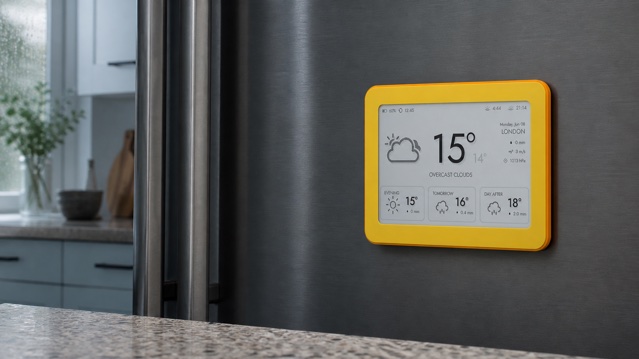
Before buying an e-ink weather display, check seven things: whether you can read it in its real location, whether it answers the decisions you make, where its data comes from, how it mounts, how often it updates, what battery life means at that interval, and what the product requires after checkout. A longer feature list cannot compensate for a screen that is too small, too dark or too awkward to live with.
The quickest rule is to choose the room and viewing distance before choosing the device. A useful home weather display should answer a small question while you are already passing it: Do I need a rain layer? Will the afternoon be warmer? Is the wind relevant to the ride? If you must pick up the display, open an app or decode a dense dashboard, its always-visible advantage is being wasted.
First decide: forecast display or weather station?
The terms are often mixed, but the products can do different jobs. A sensor-based weather station measures conditions at or near your home with instruments such as an outdoor thermometer, rain gauge or wind sensor. A connected weather display may instead retrieve observations and forecasts for a selected location. It can be more useful for planning ahead, but it does not tell you what a sensor in your own garden is measuring unless the product explicitly supports one.
Ask this question before comparing anything else: do you want a local forecast, measurements from your property, or both? Brisa is a connected forecast display. It uses 2.4 GHz Wi-Fi to show online weather and air-quality data for a chosen place; it is not a weather station with its own outdoor sensors. That distinction prevents an attractive screen from being bought for a job it cannot perform.
1. Test readability in the room, not on a product page
E-paper is reflective. E Ink explains that its displays use ambient light for viewing, much like paper, rather than relying on an LCD-style backlight. That makes a matte e-ink screen a natural fit for a bright kitchen or a desk in daylight. It also means the room must provide enough light: a display without a front light will not become readable in darkness simply because the technology is e-ink.
E Ink: how reflective displays use ambient light →
Look at the intended spot in the morning, at midday and after sunset. Check for hard reflections from windows and under-cabinet lamps. Stand where you will normally pause, not ten centimetres from the screen. Then ask whether the current condition, the next change and the smallest useful label remain clear. A technically sharp panel can still fail when the layout uses tiny type or weak contrast.
- Kitchen: test from the route between breakfast, fridge and door.
- Desk: test from your normal seated position, not with the display in your hand.
- Hallway: test from standing distance and in the evening light you actually use.
- Bedroom: confirm that the screen emits no light and that you can accept needing a room light to read it at night.
2. Match screen size and layout to viewing distance
Screen size alone does not determine legibility. A calm hierarchy can make a modest panel easier to scan than a larger screen filled with equal-weight cards. Look for one dominant answer, a clear time horizon and supporting values that remain distinct. Product photos should show the real interface at a believable scale, not a magnified mock-up that hides normal reading distance.
For a hallway, a large current temperature and simple next-period forecast may be enough. At a desk, smaller wind, pressure or calendar details can work because you sit closer. In a shared kitchen, a day overview must be obvious to more than one person. If you need to read paragraphs, interact with maps or inspect radar animation, a tablet or smart display is the more appropriate category.
Compare e-ink, tablets and smart displays by the job they do best →
3. Choose decisions, then choose weather data
Start with two or three recurring decisions. Temperature helps with clothing. The next meaningful change helps with timing. Rain probability or expected amount helps with travel and outdoor plans. Wind matters when you cycle, walk in exposed places or work outside. Sunrise, sunset and air quality deserve space only when they alter the plan. Pressure and humidity can be useful, but they should not appear merely because the data exists.
Metric labels also need context. The US National Weather Service defines probability of precipitation as the chance of a measurable amount at a point during a specified period. It is not the expected duration or quantity of rain. A good display makes the relevant period understandable; a good buyer checks which values are forecast, which are observations and when they were last updated.
US National Weather Service: what probability of precipitation means →
Build a daily weather briefing around the decisions that matter →
4. Check the source, location and age of the forecast
A polished interface is only the last step in a data chain. Ask which provider supplies the forecast, how you select the location, whether the time zone and units can be changed, and whether the screen shows an update time. A city name may be sufficient for ordinary use; coordinates are useful when several places share a name or when the nearest city is not representative.
Also check what happens when Wi-Fi or the data service is temporarily unavailable. E-paper can retain the last image without continuous power, but an old image can look deceptively current. A visible refresh time, a connection indicator or clear documentation helps you judge the information. For severe weather, use official warnings and a current detailed source rather than treating any ambient home display as an emergency channel.
OpenWeather: examples of current and forecast weather fields →
5. Choose the placement before choosing the mount
The best location is part of an existing routine. In the kitchen, a weather display can support the shared morning plan. On a desk, it can keep the day’s conditions visible without a browser tab. In a hallway, it can provide one last check before shoes and coat. Each location changes the ideal scale, angle and amount of information.
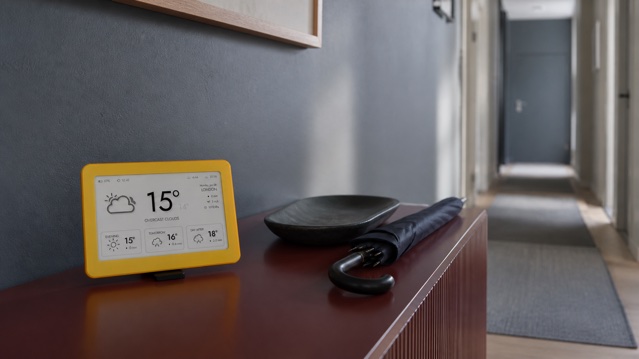
See the Brisa Daylo e-ink weather display on Etsy →
A magnetic back is useful only on a suitable ferromagnetic surface. Not every stainless-looking refrigerator door holds magnets, so test the exact panel rather than assuming from its finish. On wood, stone or non-magnetic metal, use a stable stand intended for the product. Keep any display away from steam, splashes, hot appliances, direct impacts and the path of bags or keys.
See how magnetic and stand placement changes a shared display routine →
6. Translate refresh frequency into realistic battery life
E-paper holds an image without continuously refreshing it, but the complete device still uses energy to wake, connect to Wi-Fi, fetch data and draw a new screen. Battery estimates therefore depend on the refresh interval, signal quality, temperature and firmware behaviour. Compare products at the interval you intend to use, not only at the most generous laboratory setting.
Brisa Daylo has a built-in battery and adjustable refresh frequency. The current product information gives about three months at the default hourly update, with longer or shorter life when updates are less or more frequent. Charging takes about two hours over USB-C, and the cable is not included. Those numbers are useful because they state the schedule behind the estimate; your real result can still vary.
7. Check ownership after checkout
A calm screen should not create a complicated service relationship. Before buying, ask whether an account is mandatory, whether a subscription unlocks basic data, whether updates are included, whether configuration needs a phone app, and what happens if the vendor’s service changes. Also check warranty, repair information, battery replacement and whether the product can be reset without contacting support.
Brisa does not require an account or subscription. Configuration uses a temporary device setup flow, software updates are free, and the battery is designed to be user-replaceable. These are product-specific answers, not automatic properties of e-ink. Apply the same checklist to every display you compare.
Use the wider e-ink display checklist for calendars and shared dashboards →
A practical room-by-room choice
- Choose the kitchen when several people need the same glanceable forecast and the screen can sit safely away from heat and water.
- Choose the desk when one person wants more detail at closer range and a stand fits the workspace.
- Choose the hallway when the main job is a final clothing, rain or travel check before leaving.
- Choose a tablet or smart display when you need touch, radar animation, voice, video, alerts or frequent interaction.
- Choose a sensor weather station when measurements from your own property are more important than an online location forecast.
The ten-minute pre-purchase test
- Write the one decision the display must answer most often.
- Measure the normal reading distance and the available surface.
- Photograph the spot in its brightest and darkest ordinary light.
- Confirm forecast source, location method, units, time zone and update timestamp.
- Check whether the layout makes now, later and rain easy to separate.
- Verify the exact mounting surface or the dimensions of the stand.
- Compare battery estimates at your chosen refresh interval.
- Review Wi-Fi, account, subscription, update, repair and reset requirements.
- Confirm the display is not being sold as a sensor station if it has no sensors.
- Check the current listing, warranty, returns and what is included in the box.
Where Brisa Daylo fits
Brisa Daylo is a 7.5-inch matte e-ink information display for a selected location. Depending on the layout, it can show forecast, temperature, rain, humidity, wind, pressure, air quality and sunrise or sunset, and some layouts combine weather with calendar context. Its magnetic back is intended for suitable steel surfaces, while the detachable magnetic stand serves desks, shelves and hallway consoles.
It is suited to people who want a periodically updated, non-glowing overview rather than a touch interface or live sensor console. Choose the display that fits the room, the question and the maintenance rhythm—not the one with the longest list of fields.
Explore Brisa weather and calendar layouts →
E-ink weather display buying questions
What should I check before buying an e-ink weather display?
Check readability in the intended light and at the intended distance, the source and age of forecast data, the layouts and metrics, mounting, Wi-Fi, refresh options, realistic battery life and any account or subscription requirements.
Is an e-ink weather display the same as a weather station?
Not necessarily. A weather display may show online forecast data without measuring conditions itself. Brisa uses Wi-Fi to show online forecast and air-quality information; it is not a sensor-based weather station.
Where is the best place for a home weather display?
Choose the place where a decision already happens: the kitchen for the household morning plan, the desk for a focused workday view or the hallway for a final check before leaving.
How often should a weather display update?
Match the interval to the decision. Hourly updates suit an ordinary home forecast; hazardous or fast-changing weather still requires official warnings and a current detailed source.