A smart display without a subscription can be easier to budget for and calmer to own, but the phrase “no subscription” answers only one question: whether a recurring payment is currently required. It does not automatically tell you whether an account is mandatory, whether core features depend on a vendor cloud, how long security updates are expected, or whether you can reset and pass the device on. Those details determine whether a screen feels like a product you own or a service you keep negotiating with.
Use the seven questions below before comparing colors or templates. They work for calendar displays, weather dashboards and ambient information screens. They also help you read product claims precisely: a good listing should separate facts that are true today from promises nobody can responsibly make about every future API, network standard or company.
Start with a three-layer definition of “subscription-free”
First, identify the purchase price: hardware, stand, power supply, shipping and any required accessory. Second, identify recurring vendor charges: monthly or annual plans, premium layouts, data packages or storage. Third, identify external dependencies: Wi-Fi, forecast providers, calendar feeds, market-data services and app-store accounts. A display may have no vendor subscription while still needing free online data. That is not a contradiction, but it should be disclosed.
The European Commission warns that recurring charges, billing frequency and trial-to-paid transitions should be clear when consumers enter card details. For a display sold as subscription-free, the practical test is simpler: can you set it up and use every advertised core feature without entering payment details for an ongoing plan? If an optional service exists, its benefit and price should be distinguishable from the basic product.
European Commission: recurring subscription traps and clear billing information →
1. Which functions remain available without paying again?
Write down the job you are buying the display to do. For a household calendar it may be “show today and the next few events.” For weather it may be “show the current conditions and the next meaningful change.” For a quiet market screen it may be “show three selected values without alerts.” Then ask whether that exact job is included at purchase, rather than assuming that a free tier will always contain it.
Look for plan limits hidden behind broad words such as basic, premium or pro. Check the number of calendars, locations, layouts or household members; update frequency; history; advertising; exported data; and remote access. A seller does not need to promise that nothing will ever change, but it should state what the product includes now. Save the manual and a copy of the current product description with your receipt.
Compare e-ink, tablets and smart displays by the job each does best →
2. Is an account required for setup or everyday use?
No subscription and no account are different claims. An account can provide remote management and recovery, yet it also creates another credential, privacy policy and dependency. Ask whether the device can be configured in a local browser, whether a dedicated mobile app is required, what happens if you change phones, and whether closing an account disables the display.
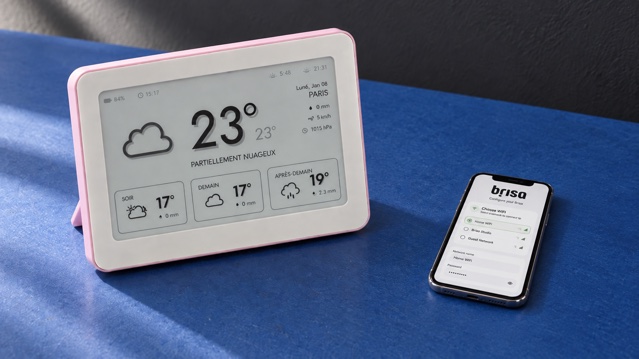
Brisa Daylo does not require a Brisa account. During setup, the device creates a temporary local Wi-Fi configuration page that you open in a phone browser. You select the home network and enter settings there; the setup page is not a public profile or a remote Brisa dashboard. This makes first use lightweight, but you should still choose the correct network and avoid configuring any connected device on an untrusted public connection.
3. Where do credentials and personal data live?
Ask separately about Wi-Fi credentials, location, calendar addresses, displayed content, diagnostics and analytics. “Local setup” does not mean that every information source is local: a weather screen must contact a forecast service, and a calendar layout must retrieve events from the calendar feed you choose. What matters is a clear data path, the minimum information needed for the feature and a way to remove it.
Treat a private calendar iCal address like a password. Google explains that its Secret address should not be shared and can be reset if exposed. If a display accepts such a link, paste it only into the device configuration page, do not publish it in screenshots or support messages, and reset it in the calendar service before giving the device to someone else.
Google Calendar: protect and reset a Secret iCal address →
Set up a shared Google Calendar for an e-ink household view →
4. What depends on the internet, the vendor and third parties?
Draw a small dependency chain: display, home Wi-Fi, internet connection, vendor software and data provider. A static e-paper panel can keep its last image visible without power, but that image may become stale when a network or data source is unavailable. Look for an update time or status indicator, and decide how old the information can be before it stops being useful.
Ask what the device shows during an outage, whether settings remain on the hardware, and whether a temporary failure requires a full setup. For time-sensitive warnings, financial decisions or medical information, an ambient screen should never be the only source. Subscription-free ownership reduces a billing dependency; it does not remove the ordinary dependencies of connected information.
Check data freshness, placement and battery life in the e-ink weather display guide →
5. How are software updates delivered—and for how long?
Internet-connected devices need a credible update path. The UK National Cyber Security Centre recommends checking how long a smart product will receive updates before buying, installing updates promptly and replacing devices that are no longer supported when the risk warrants it. In the UK, manufacturers of consumer connectable products must publish a minimum security-update period; elsewhere, the same question remains worth asking even when disclosure is not legally required.
UK NCSC: choosing, updating, resetting and disposing of smart devices →
“Free updates” should mean no separate fee for software currently supplied by the maker; it is not the same as an unlimited lifetime guarantee. Check whether updates are automatic, manual or installed through a browser, how failures are recovered, and where release or support information is published. The FTC likewise recommends keeping internet-connected devices and their firmware current.
US FTC: secure connected devices and keep firmware updated →
6. Can you reset, repair and pass the display on?
Ownership becomes concrete when something changes. Can you erase Wi-Fi and content settings without contacting support? Is there a documented factory reset? Can the battery be replaced, and by whom? Are standard screws, connectors and charging methods used? Does the warranty explain what is covered? A device that can be maintained and safely transferred has a clearer second life than one permanently tied to an inaccessible account.
See the subscription-free Brisa Daylo on Etsy →
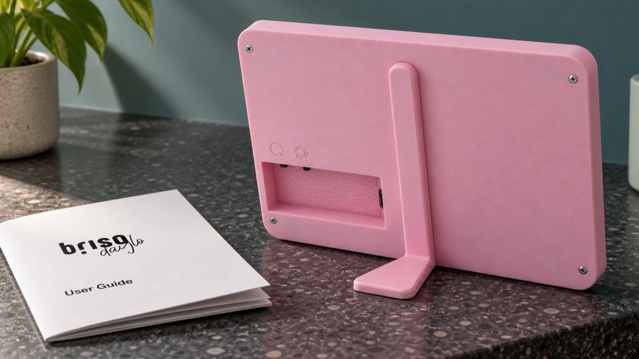
Brisa Daylo charges over USB-C and has a rear control used for refresh, configuration and reset through documented press lengths. Its stand detaches, and the battery is designed to be user-replaceable. The manual should stay with the device because it explains setup, charging and reset. Do not open a device merely to confirm these claims; use the documentation and ask the seller when repair details are unclear.
Download the Brisa Daylo user guide (PDF) →
7. What support exists if the business or service changes?
Ask where support is provided, how long replies usually take, whether the manual is downloadable, and which features rely on services outside the maker’s control. Then separate reasonable evidence from impossible guarantees. A published support policy, exportable settings and a hardware reset are useful evidence. “Works forever” is not: Wi-Fi standards, certificates, APIs and companies can all change.
The FTC advises people selling or transferring connected-home products to reset them, remove personal information and review the instructions. Apply the same thinking at purchase. A product with an understandable off-boarding path is easier to own even if you never use it.
US FTC: reset connected-home devices and remove personal information before transfer →
A ten-minute ownership checklist
- Name the one core job and confirm it works without a recurring payment.
- List any optional paid tier separately from what is included.
- Check whether a vendor account, mobile app or app-store login is mandatory.
- Identify where Wi-Fi, location, calendar links and diagnostics are stored.
- Mark every internet and third-party data dependency.
- Find the update method and the stated support period, if one is published.
- Download the manual and locate reset instructions before purchase.
- Check the charging connector, battery service and repair route.
- Read warranty, returns and transfer or resale steps.
- Recheck the live listing for current price, availability and included accessories.
Where Brisa Daylo fits this checklist
Brisa Daylo is a 7.5-inch matte e-ink information display with weather, calendar and market layouts. It does not require a Brisa account or subscription. Setup uses a temporary local configuration page, software updates supplied by Brisa are currently free, charging uses USB-C, and the battery is designed for user replacement. Online layouts still need 2.4 GHz Wi-Fi and their stated external data sources.
Those are current product facts, not a claim that hardware, third-party APIs or internet services can never change. That distinction is the point of a trustworthy subscription-free offer: the seller should explain the ownership model plainly enough that you can make the decision without a lifetime slogan.
Use the wider checklist for choosing an e-ink calendar display →
Explore Brisa weather, calendar and market layouts →
Subscription-free smart display questions
What does “no subscription required” actually mean?
It should mean the advertised core functions work without a recurring payment. Ask the seller to identify those functions, any optional paid services, third-party data dependencies and what happens if an external service changes.
Can a subscription-free display still require an account?
Yes. Payment and account requirements are separate. A product may have no monthly fee but still require a vendor login, cloud app or third-party account. Check setup, daily use, password recovery and deletion before buying.
Does no subscription guarantee the display will work forever?
No. Hardware can age and online APIs, security requirements, support policies and businesses can change. Look for a clear support period, update method, reset instructions and an honest description of any online dependencies.
Does Brisa Daylo require a Brisa account or paid plan?
No. Brisa Daylo is configured through a temporary local Wi-Fi page and does not require a Brisa account or subscription. Online layouts still depend on Wi-Fi and their stated data sources, so no recurring Brisa fee is not a promise that every external service can never change.